
Quick answer: When a KitchenAid built-in wall oven goes completely dead with a blank display, a blown KitchenAid oven thermal fuse is one of the most common causes. The thermal fuse sits behind the control panel and cuts power when that area gets too hot, which protects the user interface and the main control board. The fuse usually blows for one of two reasons: the oven’s cooling fan has stopped working, or a long self-cleaning cycle overheated the electronics. Always test the cooling fan before replacing the fuse, because a new fuse will blow again on the first use if the fan is bad.
Recently we got a call from a homeowner in the Benders Landing neighborhood of Spring, TX. Their KitchenAid built-in single wall oven was dead. No clock, no lights, no beep. Nothing on the screen at all.
This is a call we get a lot in November. Most of the time, the job description already tells us a big part of the story. When the customer gives us the model number on the phone, we can look up the parts diagram before we leave the shop and come to the house prepared. That saves the homeowner a second visit and saves days of waiting.
What We Found Inside This KitchenAid Wall Oven
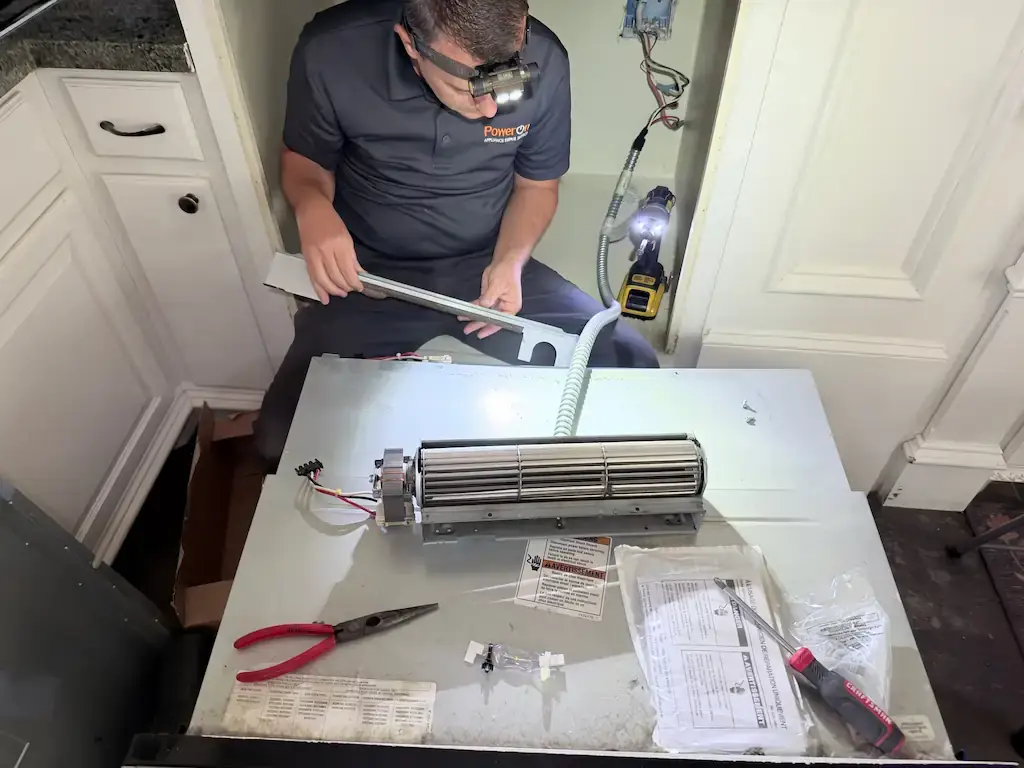
A built-in wall oven is heavy, and it sits tight inside custom cabinetry. To get to the parts behind the control panel, we slide the oven out of the cabinet. We use a special oven dolly for this, especially on heavy double ovens, so the cabinets, trim and floor don’t get scratched or chipped. It takes a little longer, but your kitchen looks the same when we leave as it did when we arrived.
With the oven out, we checked the incoming power first. The house was sending normal power to the oven, so the breaker and the wiring were fine. Next we checked the thermal fuse, part number W10545291, which sits right behind the user interface and in front of the main control board. The fuse was open. No continuity. That explained the blank screen: with the fuse open, the control board was not getting any power.
Many repair visits would stop there: put in a new fuse, the screen lights up, job done. But a thermal fuse does not blow by itself. Something made that area too hot. So before we put in a new fuse, we tested the cooling fan. It did not run at all.
That was the real problem. Without the cooling fan pushing hot air out, the heat built up behind the control panel until the fuse did its job and cut the power. If we had replaced only the fuse, the oven would have worked for a few minutes, maybe one meal, and then blown the new fuse again. So we replaced the cooling fan and the thermal fuse, reinstalled the oven, and ran a bake test. The display came back on, the fan started up with a steady hum, and warm air flowed out of the vent above the door the way it should.
What a KitchenAid Oven Thermal Fuse Does
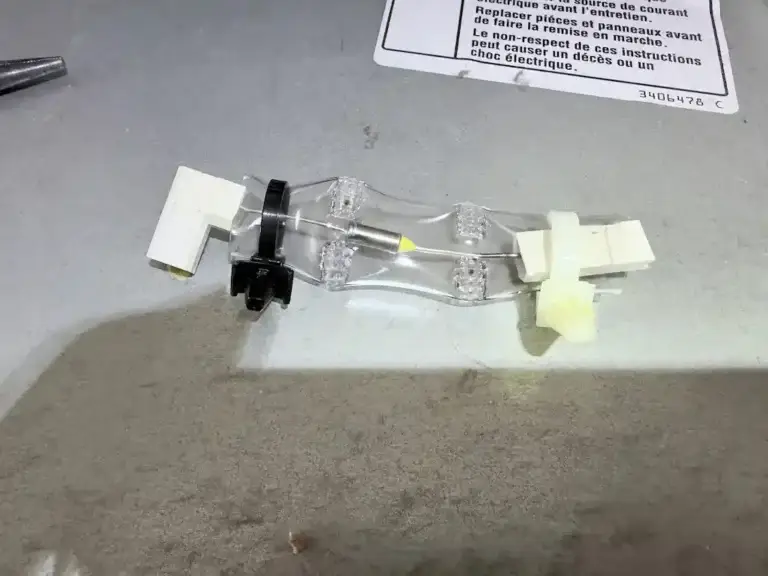
Think of the thermal fuse as a smoke detector that also flips the breaker. It watches the temperature behind the control panel. If that area gets hotter than it was designed to handle, the fuse opens and cuts power to the oven’s electronics.
That sounds annoying when your oven goes dead, but it is a good thing. The touch control panel and the main control board are the most expensive electronic parts in the oven. The fuse itself is a small, inexpensive part. For this oven, the part ran about $40 to $50. It is built to fail first so the board does not get cooked.
One important detail: this type of thermal fuse is a one-time safety device. It does not reset. Once it opens, it has to be replaced.
How the cooling fan fits in
Every modern built-in wall oven has a cooling fan, usually a long tube-shaped blower above the oven cavity. When the oven is on, the fan pulls hot air away from the electronics and pushes it out through a vent, usually just above the oven door. It often keeps running for a while after you turn the oven off. The fan and the thermal fuse work as a team: the fan keeps things cool, and the fuse is the backup if the fan can’t keep up.
Why the Thermal Fuse Blows
1. The cooling fan stopped working
This is the most common reason a KitchenAid oven thermal fuse blows, and it is exactly what we found in Spring. A fan motor can wear out, seize, or lose power from a bad connection. When the fan stops, heat builds up behind the control panel and the fuse opens.
2. A long self-cleaning cycle
The self-clean cycle heats the oven to roughly 800 to 900°F for several hours to burn off grease and spills. That is far hotter than normal baking, and it puts a lot of stress on the fan, the fuse and the electronics. If the fan is already weak, self-clean is often what finishes it off.
3. Running self-clean right before the holidays
Every year we see the same pattern. The week before Thanksgiving, people run self-clean so the oven looks great for family. Then on Monday or Tuesday of holiday week, the oven is dead. We get many calls during that week, and a lot of them start with “I just ran the self-clean.”
4. Blocked vent or poor airflow
If the vent above the door is blocked, or the oven was installed in a cabinet without the airflow space the installation guide calls for, the hot air has nowhere to go.
5. Loose or burned wire connections
Heat can loosen terminals over time. A poor connection on the fan circuit can stop the fan even though the motor itself is still good.
6. Age and Houston heat
Ovens in Spring, The Woodlands and the rest of the Houston area often sit in kitchens that get warm in summer, and humidity is hard on motors and connectors. After 8 to 10 years of use, a cooling fan is a normal wear item.
Warning Signs Your Oven Cooling Fan Is Failing
- You no longer hear the fan hum while the oven is baking.
- No warm air comes out of the vent above the oven door during or after cooking.
- The control panel or the area around it feels unusually hot to the touch.
- The fan makes a grinding, rattling or squealing noise.
- The display flickers, resets, or goes blank during or right after self-clean.
- The oven shuts off in the middle of a cooking cycle.
If you notice any of these, don’t run self-clean until the fan is checked. That is the cycle most likely to blow the KitchenAid oven thermal fuse.
What You Can Do to Prevent It
- Listen for the fan. Next time you bake, listen for a soft hum and feel for warm air at the vent above the door. That 10-second check tells you the fan is working.
- Don’t run self-clean right before a holiday. If you want a clean oven for Thanksgiving, run it 2 to 3 weeks ahead, not the weekend before. That way, if something fails, there is time to fix it.
- Wipe up big spills first. Less buildup means a shorter, gentler cleaning cycle.
- Follow your owner’s manual. Remove racks or accessories if the manual says to, and stay home while the cycle runs.
- Keep the vent clear. Don’t hang towels over the oven door or block the vent area.
- Use light cleaning in between. Many spills come off with warm water and a non-scratch pad, so you don’t need self-clean every time.
- Leave the inside to a technician. The fuse and fan sit behind panels with live high-voltage wiring. Don’t remove the control panel yourself.
For Technicians: How We Diagnose a Dead Wall Oven
- Get the full model number before the visit and pull the tech sheet and parts diagram.
- Confirm the oven is getting proper power at the junction box and that the breaker is not tripped.
- Kill power, pull the oven out on an oven dolly, and protect cabinets and flooring.
- Check the thermal fuse for continuity. If it is open, do not stop there.
- Test the cooling fan motor: check winding resistance, check for a seized shaft, and verify voltage reaches the fan when the oven calls for it.
- Inspect the connectors and wire harness near the control area for heat damage or loose terminals.
- Follow the manufacturer tech sheet for any additional limit switches or sensors on that model.
- Replace the root cause (the fan, in this case) along with the fuse.
- Reinstall, restore power, and run a bake test. Confirm the fan runs, air flows from the vent, and the display stays on before you leave.
Why Homeowners Call PowerOn
PowerOn Appliance Repair Service repairs KitchenAid wall ovens in Spring, TX and across North Houston. We’re a family-run company, founded in 2018, BBB Accredited, with 4.9 stars across 1,600+ reviews and eight technicians on the road.
- We find the reason the part failed, not just the part that failed. A fuse alone would have been a cheaper visit that day, and a second call a week later.
- You get the price before any work begins.
- The service call fee is waived when you proceed with the repair.
- Our warranty: 30-day labor warranty and parts coverage up to one year, depending on the brand and installed part.
- We protect your kitchen. Heavy wall ovens come out on a proper oven dolly.
We work for tomorrow, not for today.
We serve Spring, The Woodlands, Tomball, Katy, Cypress, Montgomery, Magnolia, Conroe, Willis, Huntsville and Shenandoah. If your oven went quiet before the holidays, call us at (346) 379-3809 or book your KitchenAid oven repair online.
For reference, you can see the original thermal fuse on the KitchenAid parts site.
Frequently Asked Questions
Why is my KitchenAid oven completely dead with a blank screen?
A blank screen on a KitchenAid wall oven often means the thermal fuse behind the control panel has blown and cut power to the control board. It can also be a tripped breaker or a power supply problem. If the breaker is fine, the oven needs a technician to test the fuse and the cooling fan.
What does the thermal fuse do in a wall oven?
The thermal fuse protects the touch control panel and the main control board from overheating. If the area behind the panel gets too hot, the fuse opens and shuts off power. It is a one-time safety part that does not reset and must be replaced once it blows.
Can self-cleaning blow the thermal fuse in my oven?
Yes. The self-clean cycle runs at roughly 800 to 900°F for several hours, which puts heavy stress on the cooling fan and electronics. If the fan is weak or not running, self-clean is one of the most common times for the thermal fuse to blow.
Is it enough to replace just the thermal fuse?
Not if the cooling fan is bad. A thermal fuse blows because something got too hot, usually a failed cooling fan. If you replace only the fuse, it will likely blow again on the first use, so the fan should always be tested first.
How do I know if my oven cooling fan is working?
While the oven is baking, listen for a steady hum and feel for warm air coming out of the vent just above the oven door. The fan often keeps running for a while after the oven is turned off. No sound and no airflow is a sign the fan needs to be checked.
How much does a KitchenAid oven thermal fuse cost?
On the KitchenAid wall oven we repaired in Spring, TX, the thermal fuse part (W10545291) cost about $40 to $50. The total repair depends on whether the cooling fan or other parts also need replacement. PowerOn gives you the price before any work begins.
When should I run self-clean before Thanksgiving?
Run it 2 to 3 weeks before the holiday, not the weekend before. If the cycle exposes a weak fan or blows a fuse, you still have time to get the oven repaired before you need it.
Is it worth repairing a KitchenAid built-in wall oven?
In most cases, yes. A thermal fuse and cooling fan repair costs far less than replacing a built-in wall oven, which often also means new cabinet work. Built-in ovens are built to last many years with the right repairs.
Who repairs KitchenAid wall ovens in Spring, TX?
PowerOn Appliance Repair Service repairs KitchenAid wall ovens in Spring, TX, The Woodlands and across North Houston. We test the root cause before replacing parts and give you the price before any work begins. Call (346) 379-3809 to book.